All about the Trial period
💡 How to Start Your Free Trial?
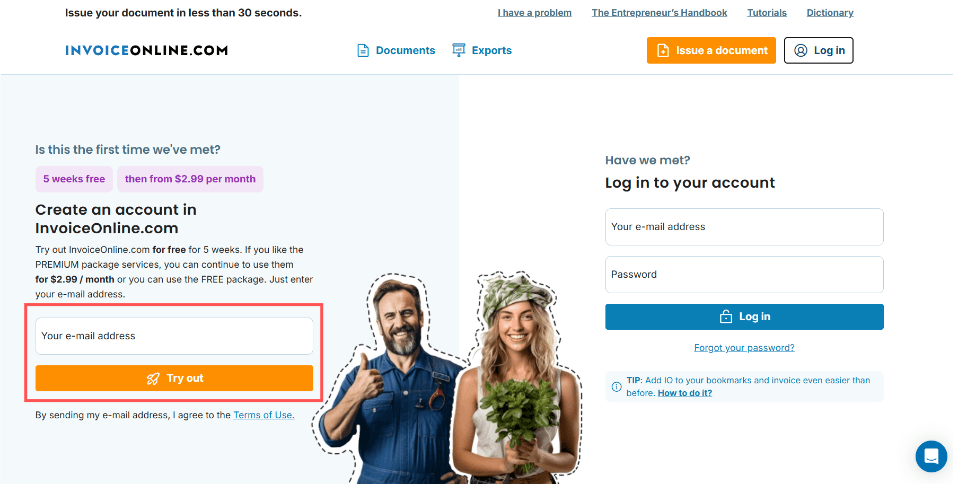
The free trial lasts 5 weeks and begins the moment you register — by entering your email address on the homepage. We’ll immediately send you your login details along with everything you need to get started. You can begin invoicing right away — easily and online.
Which Plan Is Available During the Trial?
Throughout the trial period, you'll have full access to the PREMIUM plan. In addition to creating invoices and downloading or emailing them, you’ll also be able to for example edit invoices after they've been issued. Create custom email templates. Filter your invoices easily and perform bulk actions.
⏳ What Happens After the Trial Ends?
Are you happy with InvoiceOnline, like more than 35,000 users who rely on us every day? At the end of your free trial, you can choose whether to continue with the full-featured PREMIUM plan, or switch to the simpler MINI plan. If you don’t select a plan right away, your account will move into inactive mode. You won’t be charged, and your data will remain safe. In short — your account will be “asleep” until you decide what to do next. If you prefer to delete your account completely, just email us at [email protected]. We'll remove your account and all data upon request.
💸 What if I forget to cancel — will I be charged automatically?
No need to worry. Before the trial ends, we’ll send you a reminder by email.
No subscription will renew automatically — neither PREMIUM nor MINI.
Unless you choose to continue, your account will become inactive and you won't be charged anything.
Summary
The trial period lasts 5 weeks, completely free and with no commitment
No automatic charges are made after the trial ends
You can upgrade to either the MINI or PREMIUM plan at any time
To permanently delete your (inactive) account, just contact us by email
Have any questions?
Feel free to contact us at [email protected] You may not have questions, but you’re interested in the latest updates in accounting and entrepreneurship, along with practical tips and advice? 📈 You can find them in The Entrepreneur’s Handbook.
documents with easeCreate Document