How to switch from PREMIUM plan to MINI plan
With the PREMIUM plan, you have access to the following features, among others:
Saving issued invoices
Editing invoices
Quick filtering and status display
Creating email templates
Copying invoices
Bulk actions
If you decide to switch from the PREMIUM plan to the MINI plan, you will lose access to these advanced features. You will only be able to issue invoices and then download them to your computer or send them via email at the time of issuing.

Check out detailed overviews of the features of the PREMIUM and MINI plans.
How to change from PREMIUM plan to MINI plan?
Wait until your current plan expires, then change your subscription to the MINI plan.
Click the company name in the top right corner. In the menu, right below your current plan, you will find a link to manage the subscription; alternatively, go to Company settings → Manage subscription. On the order page, select Try MINI in the MINI plan.
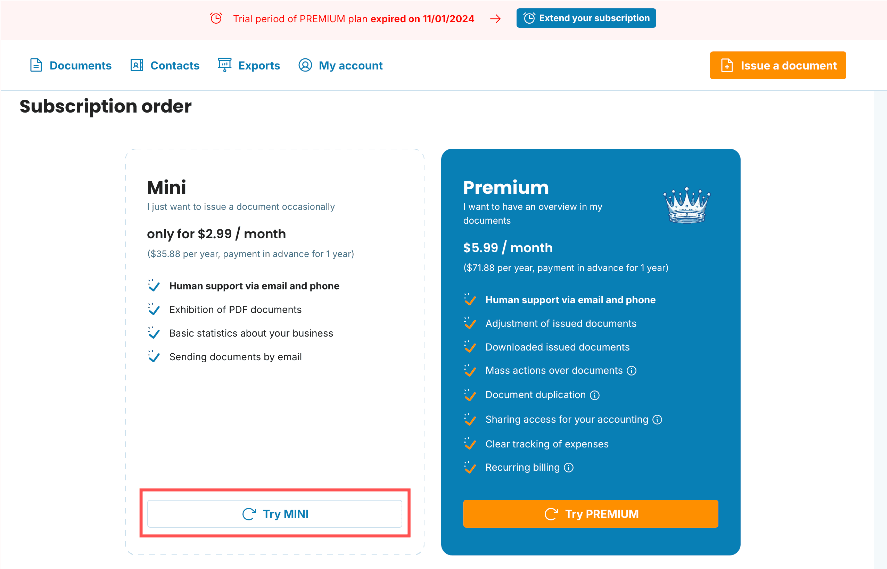

A plan always belongs to a specific company. If you manage multiple businesses under one login, first switch to the company whose plan you want to change. The plans of your other companies stay as they are.
You can pay via credit card.
Done! You can continue issuing and sending invoices. However, you will lose access to editing previously issued invoices from the PREMIUM plan.

You were a PREMIUM subscriber, tried the MINI plan, and would like to return to the PREMIUM plan? Once you change your subscription back to PREMIUM, the features will be unlocked for the invoices you created under the MINI plan.
documents with easeCreate Document